 Glowbug
NoTimer
Time tracking without the timer
by Glowbug
One-time purchase · macOS 14 Sonoma or later · Apple silicon and Intel · Version 1.0.0,
- Price
- $19.99one time
- Category
- BusinessMac app
- Requires
- macOS 14or later
- Size
- 8.5 MBdownload
- Version
- 1.0.015 November
- Developer
- Glowbugindie
Day done. Nothing was started or stopped.
- 17:40–18:00Mail October invoice questionUnsortedUnsorted: nothing points to a client yet.
- 17:05–17:40Visual Studio Code cart.swift — storefrontAcme · Websitebecause the repository is acme/storefront
- 16:40–17:05Calendar Design reviewHarbour Labs · Appbecause someone from harbourlabs.com is in the meeting
- 15:22–16:40Xcode OnboardingView.swift — harbour-iosHarbour Labs · Appbecause the repository is harbourlabs/harbour-ios
- 15:10–15:22Safari Private windowPrivateA private window: only the time is kept
- 12:55–15:10Figma Onboarding v4Harbour Labs · Appbecause the file is in the Harbour Labs folder
- 12:00–12:55Away Lunch, probablyAwayYou were away. NoTimer asks what it was when you come back.
- 11:30–12:00Calendar Weekly syncAcme · Websitebecause someone from acme.com is in the meeting
- 11:02–11:30Google Chrome Orders · Acme AdminAcme · Websitebecause the website is acme.com
- 9:18–11:02Visual Studio Code checkout.swift — storefrontAcme · Websitebecause the repository is acme/storefront
- 9:00–9:18Mail Re: Acme homepage feedbackUnsortedUnsorted. Only the title mentions Acme, so it’s a suggestion, not a guess.
Welcome back
You were away 12:00–12:55. What was it?
Asks after 15 minutes away. You can also count it later from the timeline.
A working model of NoTimer, not a video: a made-up Friday with made-up clients. Press play, or drag through the day. The real app does this in your menu bar while you work.
- No screenshots, ever
- No account, no server
- Native Swift app
- Pay once
- Made by one person
NoTimer notices the app, file and website you work in, sorts the time to the right client, and writes what you did in words your client understands.
It is made for freelancers and small studios who bill by the hour and forget to start a timer. NoTimer sits in the menu bar and notices what you work on: the app, the window, the file, the folder, the repository and the website in front.
On Friday, review the week’s hours, money and notes on one screen, then send them to Invoicewell or export a timesheet. Everything stays on your Mac.
The problem
A timer only counts what you remember.
You start late. You forget it after lunch. The call never goes in. Over a week, that’s hours of work you did and never billed.
The same made-up day as the demo above, at $80 and $95 an hour.
- 1
Work like you always do
NoTimer sits in the menu bar and notices what’s in front: the app, the window, the file, the folder, the repository, the website.
- 2
It sorts itself, and says why
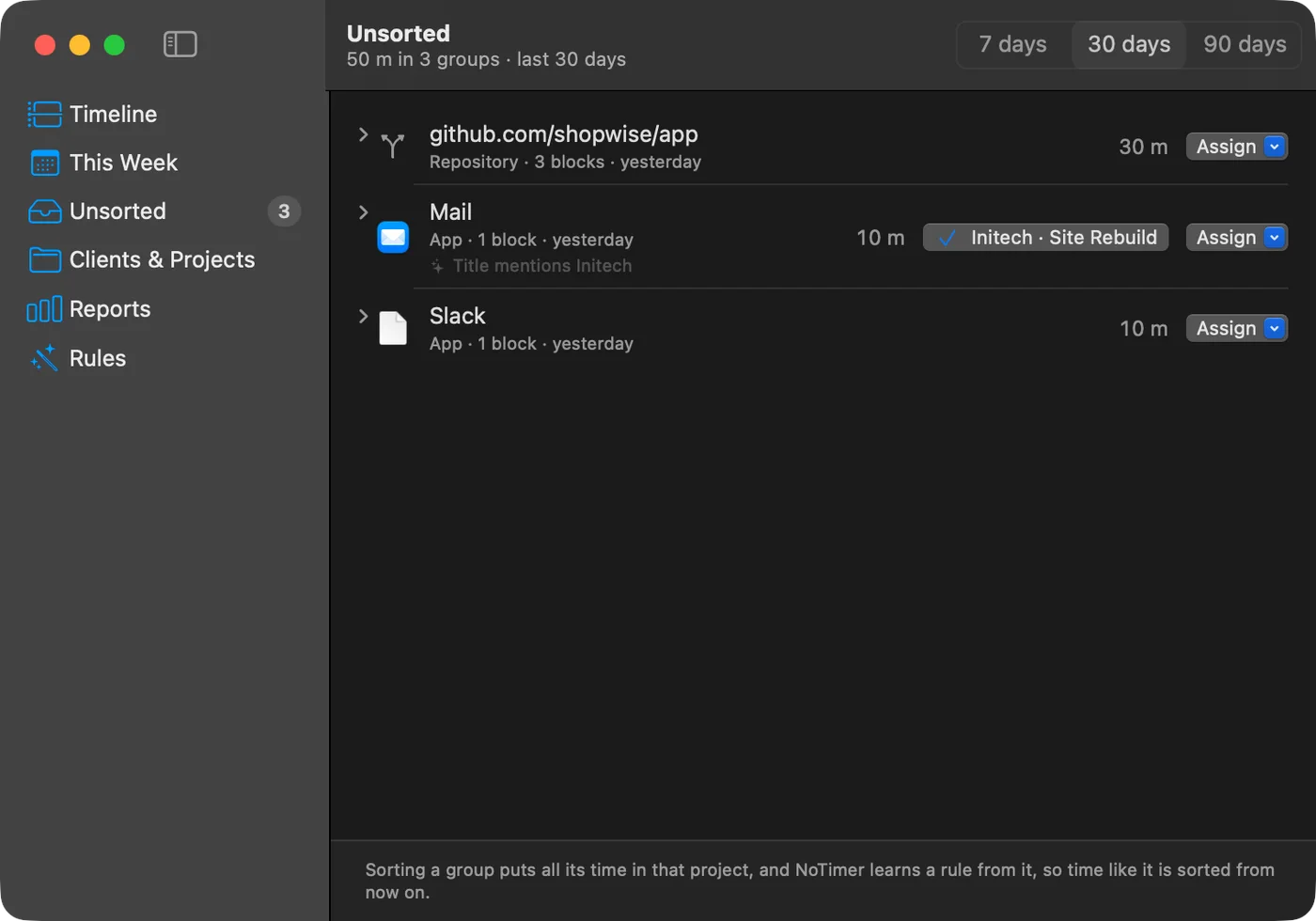
Time goes to the right client from your rules and strong clues. Anything unsure waits in Unsorted instead of guessing.
- 3
On Friday, bill it
Review the week’s hours, money and notes on one screen, then send them to Invoicewell or export a timesheet.
Smart sorting
It knows the client. And it tells you why.
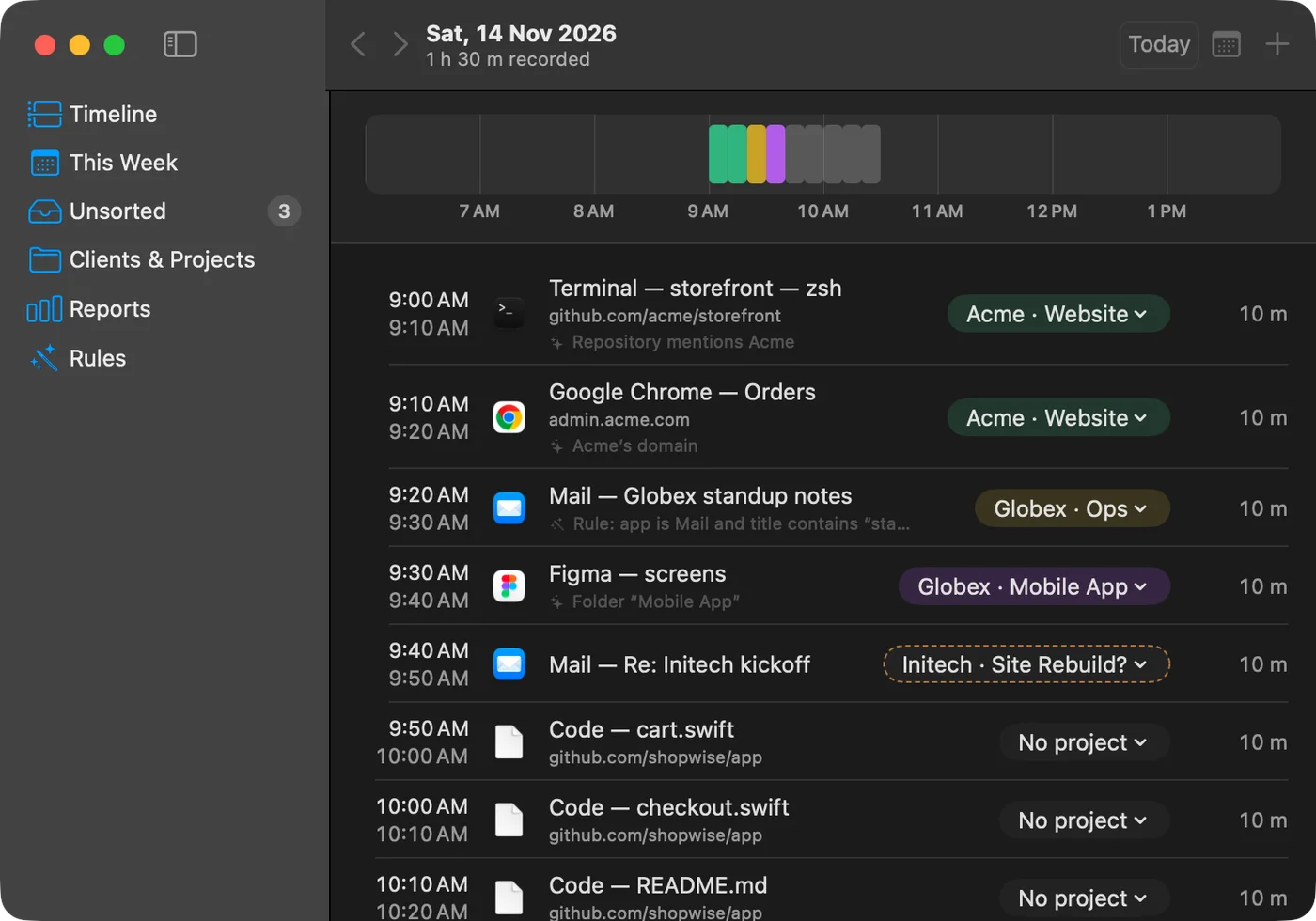
Every block says why it went where it did: the repository, the folder, the website, the client’s own domain, or who was in the meeting.
When a clue is weak, like a word in a window title, NoTimer only suggests, and the time waits in Unsorted instead of going to the wrong client. Fix one block and it learns a rule from the strongest clue, then sorts the rest like it. Try it: put the pitch deck in Northwind.
- Rules for the app, title, website, folder, repository, file name, browser profile and meeting guests
- A rule you made is never changed behind your back
- Everything can be undone
- Figma Pitch deck~/Clients/Northwind Unsorted
- Preview Brief.pdf~/Clients/Northwind Unsorted
- Visual Studio Code checkout.swiftacme/storefront Acmebecause the repository is acme/storefront
- Keynote Moodboard.key~/Clients/Northwind Unsorted
- Figma Onboarding v4~/Clients/Harbour Labs Harbour Labsbecause the file is in the Harbour Labs folder
Work notes
Notes your client actually understands.
Your tracker knows “Figma, 2 h”. Your client wants to know what you did. On macOS 26 and later, Apple Intelligence writes one line per project and day, on your Mac, from what NoTimer saw. On other Macs, smart templates write a plainer one.
These are real notes from NoTimer’s tests, not edited. Pick a day:
- Short or detailed
- Never app names, window titles or websites
- You see every note first, and your edit always wins
What NoTimer saw
- repositoryshop-frontend
- filecheckout
- filecart test
- titleFix rounding in cart totals
- titleStripe API reference: PaymentIntents
Apple Intelligence wrote
Fixed rounding in cart totals in the shop-frontend repository.
Smart template, on any Mac
Development on acme/shop-frontend. Research.
Meetings and away time
It comes back with you.
Step away for a call and NoTimer notices. When you’re back, it asks what that time was: the meeting in your calendar, with its client, and whatever you were doing before you left. One click counts it. Or don’t: it’s your time.
- Meetings come from Calendar only if you turn it on, and are only read
- Calls and videos don’t count as idle
- Asks after 15 minutes away (or 10, 30, 60, or never)
Welcome back
You were away 14:05–14:50.
Nothing counted yet. It only fills time nothing was recorded in.
Money
Money, not just minutes.
NoTimer puts what your time is worth right next to it. Today’s hours and money sit in the menu bar. Budgets and monthly retainers get a meter, with a warning at 80% and 100%, before you start working for free.
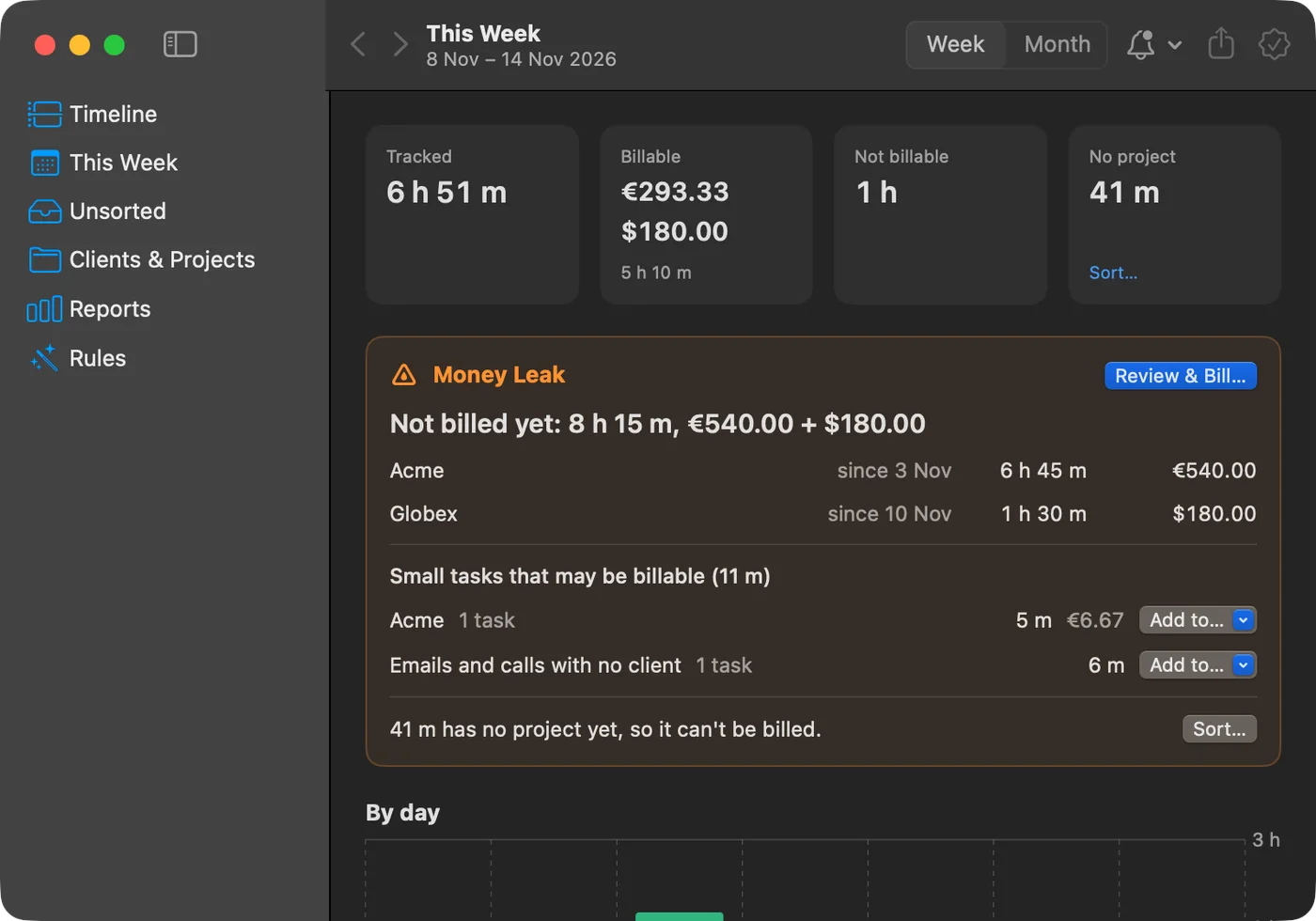
Every week, the Money Leak shows billable time you haven’t billed yet, and the small calls and emails that slipped past.
- A rate per project, per client, or your own
- Retainers can roll unused hours into next month
- A weekly review on the day and time you choose
Money Leak · this week
Privacy
Private, and you can see it.
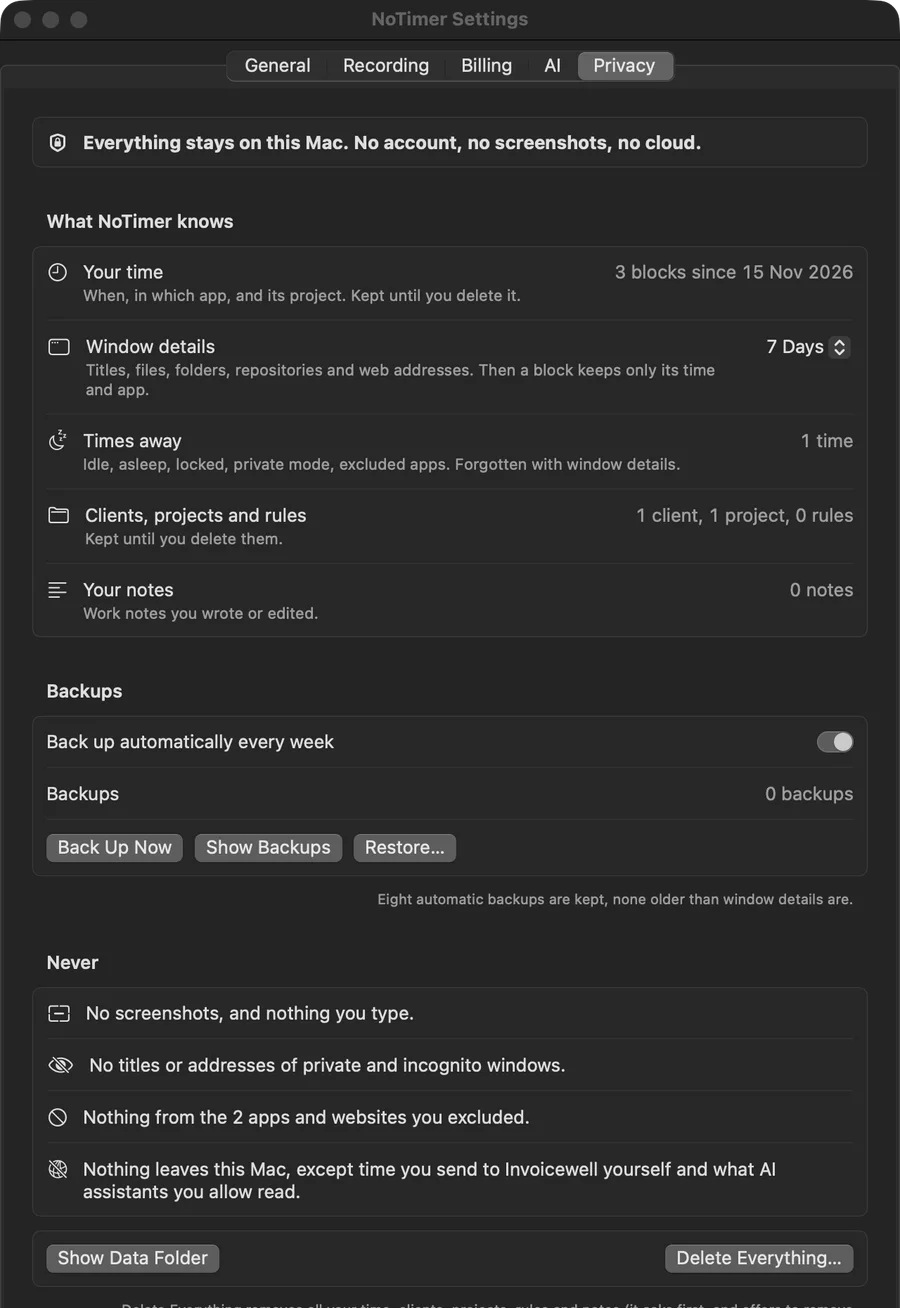
A time tracker sees a lot. So NoTimer keeps as little as it can, keeps it on your Mac, and shows you all of it.
What it reads
- The app in front, and its window title
- The open file, folder or repository
- The web address, without anything after ? or #
- Your calendar’s meetings, only if you allow it
What it never does
- Take screenshots
- Record what you type
- Look at what’s on your screen
- Upload your activity anywhere
- Ask you for an account
What you control
- Private Mode for 30 minutes, an hour or until tomorrow
- Apps and websites it should never record
- Private browser windows: time only
- Forget window details after 90 days, or 7, 30, a year, never
- Delete Everything, in one click
Billing
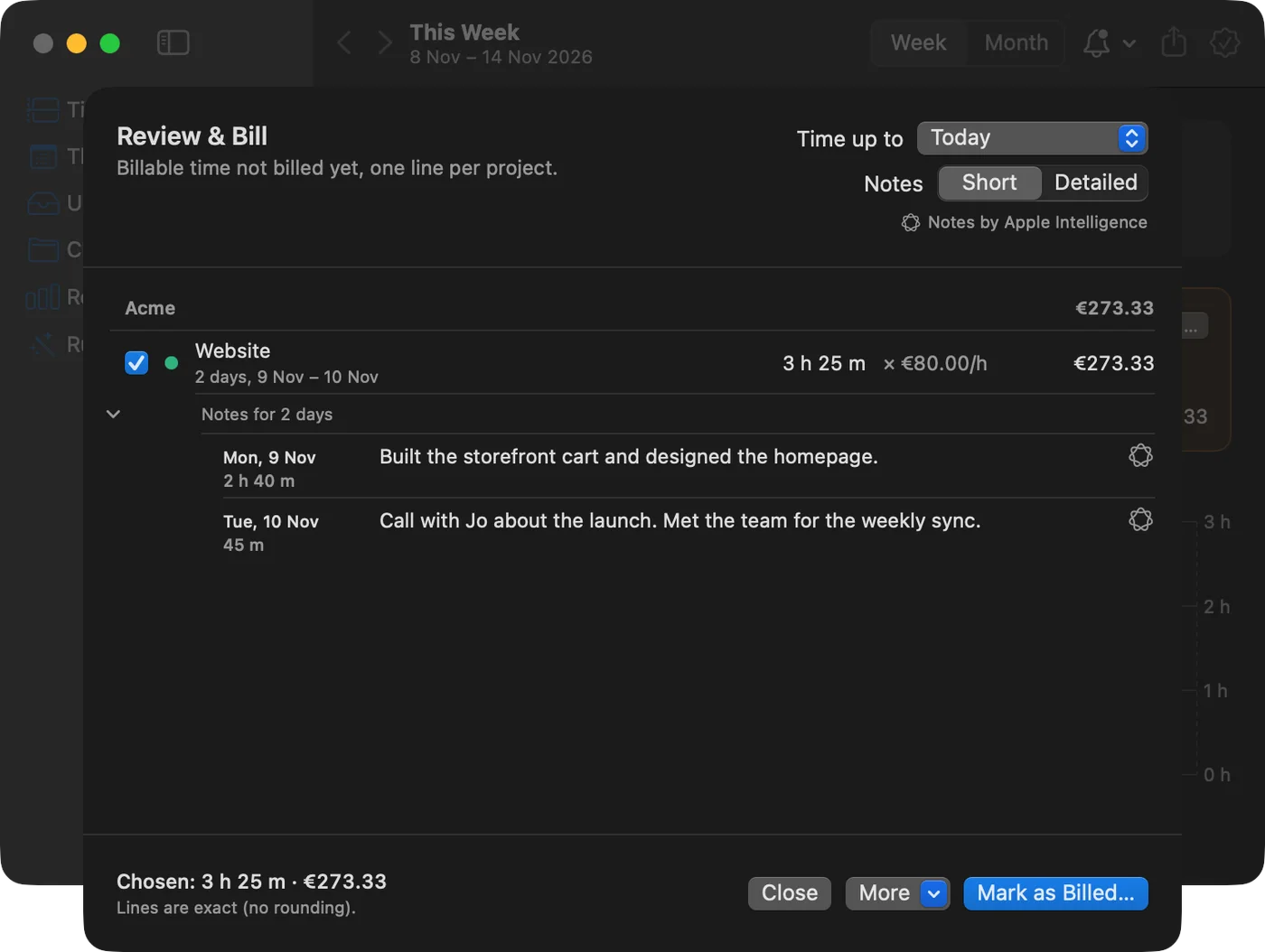
Friday: review it, then bill it in one click.
Review & Bill puts every project’s unbilled hours, money and notes on one screen. With Invoicewell on your Mac, Send to Invoicewell turns them into time entries there, and when they’re invoiced and paid, NoTimer knows. Nothing is ever sent or billed twice.
No Invoicewell? Export a timesheet for your client, or the hours for any other tool.
- A timesheet PDF for your client, A4 or Letter
- CSV that opens cleanly in Excel and Numbers, and JSON
- Billed time is locked at the rate it was billed
AI assistants
Ask your hours.
Turn it on, and Claude, Claude Code, Cursor or another MCP assistant can answer “how much can I bill Acme this month?” from your real hours, in your own words.
Assistants can read and never change anything, and they never get app names, window titles or websites.
- Off until you turn it on
- Asks you once before each new assistant
- Add to Claude or Cursor with one click
How much can I bill Acme this month?
notimer get_unbilled_time
You have 14 h 35 m for Acme not billed yet, $1,166.67 at $80/h, the oldest from 3 November. Most of it is Website (12 h 50 m); the rest is the weekly syncs.
And what did I do for them last week?
notimer get_work_notes
Monday: built the storefront checkout. Wednesday: fixed rounding in cart totals. Friday: met the team for the weekly sync…
An example with made-up hours. Assistants can read, never change, and never see app names, window titles or websites.Switching
Bring your history with you.
Coming from Timing, Toggl Track or Clockify? Import their CSV exports, or any spreadsheet with dates and times. NoTimer matches your clients and projects by name, never adds the same entry twice, and never writes over time it recorded itself.
→ your clients, projects and past hours, in NoTimer
The real app
Native, quiet, and made for the Mac.
Screenshots of NoTimer itself, with made-up clients.
Everything in NoTimer
Records by itself
The app, window, file, folder, repository and website in front. Idle, sleep and the screen lock pause it.
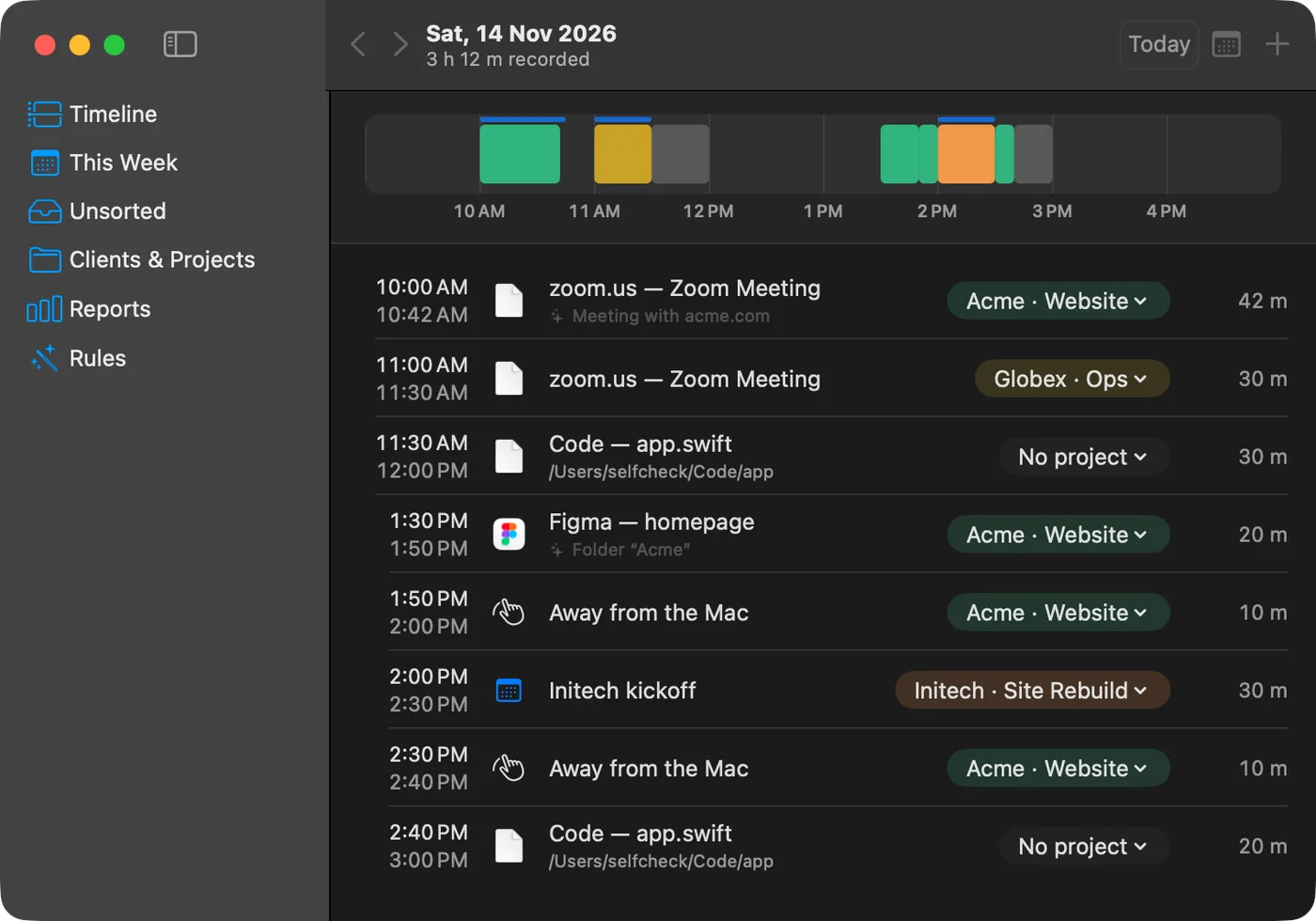
Day timeline
Your day as a bar in project colours. Drag across time to assign it, split, merge, add time by hand, undo anything.
Smart sorting
Rules plus strong clues, with the reason on every block. Fix one and it learns.
Meetings and away time
Calendar meetings sorted by who’s invited, and a question when you come back.
Menu bar
Today’s hours and money, the current project, budgets, Fix the Last Hour and Private Mode.
Budgets and retainers
In hours or money, for a project or each month, with warnings at 80% and 100%.
Reports and Money Leak
Week or month, by client and project, and the billable time still waiting.
Review and bill
One line per project at its rate, rounded the way you choose, then billed or sent.
Invoicewell link
Send reviewed hours as time entries; invoiced and paid come back.
Exports
Timesheet PDF, CSV and JSON, for one client or all, details off by default.
Work notes
By Apple Intelligence on macOS 26 and later, or by smart templates. Always editable.
AI assistants
Claude, Cursor and other MCP assistants can read your hours, if you allow it.
Import
From Timing, Toggl Track, Clockify or any spreadsheet, without doubles.
Privacy controls
Excluded apps and sites, private windows, Private Mode, what it knows, Delete Everything.
Backups
A backup every week, kept on your Mac, and Restore.
According to NoTimer’s own self-test, recording uses about 0.2% CPU on average with a quiet app in front, and about 0.5% with a window title changing every second.
Compared honestly
NoTimer, Timing, Toggl Track and Clockify.
| NoTimer | Timing | Toggl Track | Clockify | |
|---|---|---|---|---|
| How it tracks | Automatic: app, window, file, folder, repository, website | Automatic: records apps, documents and websites, plus timers | Timers you start and stop, manual entries and calendar integrations | Timer and timesheets; the desktop app’s auto tracker records apps and websites for you to turn into entries |
| Price | $19.99 once (or $29.99 with Invoicewell) | From $9 a month (Professional, billed yearly; $11 monthly). Expert $11, Connect $16 | Free for a limited number of users. Starter $9 per user a month (billed yearly), Premium $16 | Free up to 5 users. Billable rates from Basic, $3.99 per seat a month (billed yearly); invoicing from Standard, $5.49 |
| Invoices | With Invoicewell, in one click; or a timesheet PDF, CSV and JSON | Through GrandTotal, a separate invoicing app, on the Connect plan | Not on its plans page; billable rates and reports from Starter | Built in on the Standard plan and up |
| Your data | On your Mac. No account, no server | On your Mac, with Timing’s sync and cloud backup and a web app | In Toggl’s cloud, with an account | In Clockify’s cloud, with an account |
| Try first | The working demo on this page; no free trial | A 30-day free trial | A free plan, and a 30-day trial of paid plans | A free plan |
Read from each company’s own pricing page on 15 November 2026. Prices are per month, billed yearly, unless said otherwise. Automatic tracking itself isn’t unique: Timing, Chronoid, ManicTime and Clockify’s auto tracker do it too. NoTimer’s difference is what happens after.
The details
- Requires
- macOS 14 Sonoma or later
- Runs on
- Apple silicon and Intel
- Work notes by Apple Intelligence
- macOS 26 or later, with Apple Intelligence on. Smart templates elsewhere
- Permissions
- Accessibility. Calendar and browser scripting only if you want them
- Your data
- On your Mac. No account, no server, weekly backups
- Speed
- About 0.2% CPU while recording, measured
- Made for
- One person’s own time. No teams, no monitoring
- Language
- English
Pricing
Pay once. Track forever.
No subscription, no monthly bill, no account.
NoTimer
Up to 3 Macs
one-time purchase
- Automatic recording and sorting
- Work notes by Apple Intelligence or templates
- Reports, budgets and the Money Leak
- Timesheet PDF, CSV and JSON
- Send to Invoicewell in one click
- Up to 3 Macs
- Free updates
NoTimer + Invoicewell
Track it, then bill it
one-time purchase for both
- Everything in NoTimer
- Invoicewell: invoices, quotes, reminders and reports
- Send to Invoicewell, built in
- Each app on up to 3 Macs
- Free updates for both
Every Glowbug app
Shelfy, Chargeberry, Invoicewell and NoTimer
one checkout · Black Friday price until Wednesday, 2 Decemberone checkout · one-time purchase
- NoTimer, plus the other 3 apps
- A license key for each app
- Each app on up to 3 Macs
- Free updates for all 4
There is no free trial and all sales are final, so the working demo at the top of this page is the way to try it first.
Checkout and license keys by Gumroad. Requires macOS 14 Sonoma or later, on Apple silicon and Intel.
Questions
Getting started
Do I ever have to start a timer in NoTimer?
No. While NoTimer is open it records which app, window, file, folder, repository and website is in front, and turns that into blocks of time. There is nothing to start, stop or forget. For time away from the Mac, like a phone call, you can add time by hand.
Which Macs does NoTimer work on?
Any Mac with macOS 14 Sonoma or later, Apple silicon or Intel. Work notes by Apple Intelligence need macOS 26 or later with Apple Intelligence turned on; on other Macs the notes come from smart templates instead.
Which permissions does NoTimer need?
Accessibility, so it can read window titles and the open document. That is the only one it needs. Calendar is optional, for meetings. Safari and Chrome give their address without any extra permission; Arc, Opera and Firefox need you to allow NoTimer to ask them, and it explains why before macOS asks. It never asks for Screen Recording or Full Disk Access.
Is there a free trial of NoTimer?
No. NoTimer is $19.99 once, and all sales are final. The demo at the top of this page is a working model of the app, so you can try how it sorts a day before you buy.
Privacy
Does NoTimer take screenshots or record keystrokes?
Never. It reads the name of the app in front, its window title, the open file, folder or repository, and the web address without anything after ? or #. It doesn’t see what is on your screen, and it doesn’t record what you type.
Where does NoTimer keep my data?
On your Mac. There is no account and no server, and your activity is never uploaded. Window details are forgotten after 90 days unless you choose 7 days, 30 days, a year or forever; the hours themselves stay. Notes by Apple Intelligence are written on your Mac too. Settings › Privacy shows everything NoTimer knows, counted, with Delete Everything.
Clients and billing
How does NoTimer know which client the time is for?
From your rules first, then from strong clues: a client’s name in the repository, folder, browser profile or website, a client’s own domain, or someone from the client in a calendar meeting. Every sorted block says why. Weak clues, like a word in a title, only suggest a client in the Unsorted tray. When you fix a block, NoTimer learns a rule from it and sorts the rest.
Do I need Invoicewell to bill with NoTimer?
No. You can export a timesheet PDF, a spreadsheet (CSV) or JSON, or mark time as billed. With Invoicewell on the same Mac, Send to Invoicewell turns your reviewed hours into time entries there in one click, and whether they were invoiced and paid comes back to NoTimer.
More answers in each section above. Page updated .
Still deciding? Ask an AI.
Opens your AI assistant with everything about NoTimer loaded, the limits included. Ask it about how you work.